
期間限定40% OFF今すぐ確認

Qwen Image 3 AI画像ジェネレーター Qwen Image 3

無料オンラインのワークスペース。テキストから画像と画像から画像 — まず Qwen Image 3、他モデルはワンクリック。

Qwen Image X はブラウザで開く無料の Qwen Image 3 AI画像ジェネレーターです。密度の高いレイアウト、くっきりした小さな文字、多言語ポスターには Qwen Image 3 を既定にし、ページを離れずにモデル切替も可能。登録クレジットで開始 — カード不要。

  • 既定は Qwen Image 3
  • テキストから画像+画像から画像
  • 密度の高いボード、小さな文字、12言語
  • 登録クレジット — カード不要で開始
Qwen Image 3 AI画像ジェネレーターのワークスペース結果 — マルチパネル絵コンテと二言語の風景ポスター
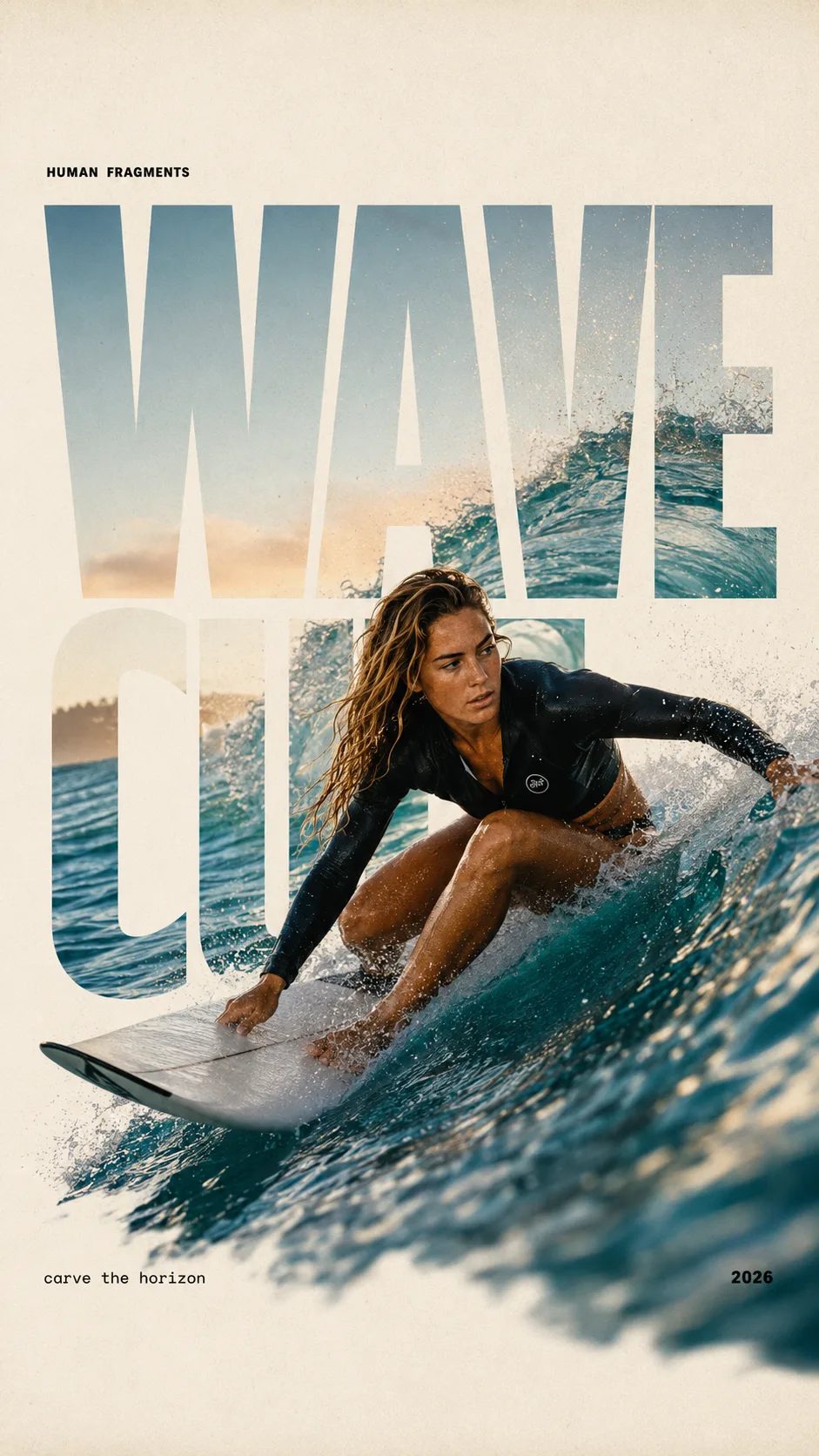
HUMAN FRAGMENTS editorial poster sample

Create a 9:16 editorial poster in the HUMAN FRAGMENTS visual system. Theme: [surfing / basketball / boxing / cake decorating] Subject: [gender, age, appearance, outfit] Action: [specific movement or handcraft] Scene: [location and environment] Title: [custom two-word title] Supporting line: [one short phrase] Year: 2026 Use oversized cropped typography as the main structural framework. The letters should act as windows that reveal the surrounding environment, while the main person remains visually complete in front of the type. Do not let the letters cut through the face, torso, arms, thighs, or other important parts of the body. Let one key action element break beyond the typography to create strong depth: 1. WAVE CUT — a surfer carving across a rising wave, with the board nose, hand, water spray, and curled wave breaking outside the letters. 2. RIM RISE — a basketball player reaching toward the hoop from a camera placed above the rim, with the basketball, hand, and hoop fully outside the letter masks and aligned naturally. 3. IMPACT FRAME — a boxer throwing a straight punch toward the camera, with the foreground glove enlarged and breaking beyond the typography while the gym remains inside the letters. 4. SOFT SWIRL — a graceful young woman decorating a cake, with the piping bag, hands, cake, and cream details extending beyond the letters while the bakery interior appears inside the type. Use realistic photography, believable anatomy, natural skin texture, strong foreground perspective, subtle paper grain, a warm off-white background, restrained colors, and clean editorial spacing. Keep the text minimal and freely placed: [Title] HUMAN FRAGMENTS [Short supporting line] 2026

Create a 9:16 editorial poster in the HUMAN FRAGMENTS visual system. Theme: [surfing / basketball / boxing / cake decorating] Subject: [gender, age, appearance, outfit] Action: [specific movement or handcraft] Scene: [location and environment] Title: [custom two-word title] Supporting line: [one short phrase] Year: 2026 Use oversized cropped typography as the main structural framework. The letters should act as windows that reveal the surrounding environment, while the main person remains visually complete in front of the type. Do not let the letters cut through the face, torso, arms, thighs, or other important parts of the body. Let one key action element break beyond the typography to create strong depth: 1. WAVE CUT — a surfer carving across a rising wave, with the board nose, hand, water spray, and curled wave breaking outside the letters. 2. RIM RISE — a basketball player reaching toward the hoop from a camera placed above the rim, with the basketball, hand, and hoop fully outside the letter masks and aligned naturally. 3. IMPACT FRAME — a boxer throwing a straight punch toward the camera, with the foreground glove enlarged and breaking beyond the typography while the gym remains inside the letters. 4. SOFT SWIRL — a graceful young woman decorating a cake, with the piping bag, hands, cake, and cream details extending beyond the letters while the bakery interior appears inside the type. Use realistic photography, believable anatomy, natural skin texture, strong foreground perspective, subtle paper grain, a warm off-white background, restrained colors, and clean editorial spacing. Keep the text minimal and freely placed: [Title] HUMAN FRAGMENTS [Short supporting line] 2026
この Qwen Image 3 AI画像ジェネレーターが単発ツールより勝る理由

多くの人は1つの仕事のためにここに来ます:Qwen Image 3 で使える画像を作る — ポスター、絵コンテ、二言語広告、学習シート。Qwen Image X はその Qwen Image 3 AI画像ジェネレーターを正面に置き、テキストから画像と画像から画像を同じワークスペースにまとめます。下書きに別の見た目が要るときは、プロンプトを別サイトに貼り直さずにモデルを切替えられます。無料の登録クレジットで既定ティアの開始分をカバーし、支払い前に試せます。

使い方

Qwen Image 3 AI画像ジェネレーターを3ステップで実行

空の入力欄からダウンロードできる静止画まで — インストール不要、別途 Qwen アカウント不要、タブの行き来も不要。

  1. 1

    Qwen Image 3 のまま(または他モデルを選ぶ)

    ピッカーは密度の高いレイアウトとくっきり文字向けに Qwen Image 3 が既定です。より速い下書きスタイルが要る?ワンクリックで切替 — プロンプトと参照はそのまま読み込まれます。

  2. 2

    プロンプトを書くか写真を上げる

    テキストから画像なら平易な言葉でシーンを説明。画像から画像の編集なら参照をドロップ。マルチパネルボードや細かいラベルが要るとき、Image 3 は長いプロンプトがよく効きます。

  3. 3

    生成、磨き、ダウンロード

    生成して静止画を確認。もう1パス、プロンプト調整、画像から画像で再スタイル。失敗した実行はクレジット自動返金。有料プランには商用利用が含まれます。

この Qwen Image 3 AI画像ジェネレーターを使う人

同じ無料オンラインワークスペース — 教育、グロース、デザイン、ショップチームごとの仕事。

  • コース制作者

    小さな文字が読める必要があるとき、Qwen Image 3 AI画像ジェネレーターでラベル付きワークシート、マルチパネル解説、数式の多いスライドを構築。長いプロンプト1本で授業レビュー用のボード全体を下書きできます。

  • グロースマーケター

    二言語のキャンペーンポスターと広告バリエーションをすばやく出荷。登録クレジットで無料開始し、Image 3 でレイアウトを固め、ピッカーを離れずに見出しを反復。

  • プロダクトデザイナー

    くっきりラベル付きのパッケージモックと UI 風の画面を探索。画像から画像で商品写真を再スタイルしつつ、ブランド文字を意図どおりに保てます。

  • ショートドラマチーム

    絵コンテグリッドとビートシートを1パスで配置。並列パネルがはっきり分かれ、本撮影前に作家と監督がテンポにコメントできます。

  • EC セラー

    カタログ静止画とサイズ表風ボードを生成し、画像から画像で磨く。画像上の読めるラベルで、ぼやけたモックではなく仕上がった掲載に。

  • ローカライズ責任者

    1つのビジュアルシステムを保ち、ポスター上の言語だけ差替え。Image 3 の多言語テキスト支援で地域キャンペーンのレイアウトを維持。

含まれるもの

この Qwen Image 3 AI画像ジェネレーターに付くもの一式

  • まず Qwen Image 3

    既定モデルは Qwen Image 3 — 密度の高いレイアウト、小さな文字、多言語作業向け。Qwen Image 2 など他モデルも同じピッカーでワンクリック。

  • レイアウトを尊重するテキストから画像

    ポスター、インフォグラフィック、UI モックを平易な言葉で。Qwen Image 3 AI画像ジェネレーターは、ぼやけた単一被写体より整理された領域が必要なときに最も強いです。

  • 画像から画像の編集

    参照を上げて再スタイル、細部修正、シーン拡張。モデルを切替えてもプロンプトと写真はそのまま。

  • 登録クレジットで無料開始

    新規アカウントは既定ティアの試行用に無料クレジットを取得。量が要るときだけチャージや購読 — ワークスペースを開くだけならカード不要。

  • 有料プランで商用利用

    有料プランには広告、クライアント案件、店舗向けの商用ライセンスが含まれます。無料枠の静止画は、プランに別段の定めがない限り個人テスト用です。

  • 失敗時の自動返金

    サーバーエラー、タイムアウト、フィルタはクレジットを自動返金。受け取った出力にだけ課金されます。

Qwen Image 3 AI画像ジェネレーターについてよくある質問

Qwen Image X の Qwen Image 3 AI画像ジェネレーターとは?

Qwen Image X 上の無料オンライン画像ワークスペースで、既定で Qwen Image 3 が選ばれています。ブラウザでテキストから画像と画像から画像を実行し、1つのピッカーでモデルを切替え、登録クレジットで開始 — 別途インストール不要。

Qwen Image 3 AI画像ジェネレーターは無料で試せる?

はい。新規アカウントは既定ティアの生成(例:Qwen Image 3 の 1K)をカバーできる無料登録クレジットを取得。開始にクレジットカードは不要。より多い量や商用ライセンスが要るときだけクレジット購入や購読。

なぜ他モデルではなく Qwen Image 3 が既定?

Qwen Image 3 は使える密度の高い出力向け:長いプロンプト(最大約 4.5k トークン)、読める小さな文字、マルチパネルボード、多言語レイアウト。速度やスタイルが違うときは他モデルも選べます。

テキストから画像に加えて画像から画像もできる?

はい。参照写真を上げて変更内容を説明。ピッカー内の多くのモデル — Qwen Image 3 含む — が画像から画像に対応し、ゼロからやり直さずに再スタイルや磨きができます。

ホームページとの違いは?

ホームページはブランドと Qwen Image シリーズ全体を説明します。この /image ページはライブの Qwen Image 3 AI画像ジェネレーターワークスペース — ジェネレーター優先で、いま画像を作るための手順、用途、FAQ に焦点があります。

Qwen Image 3 に向く画像の種類は?

構造化されたビジュアル:絵コンテ、新聞風ページ、試験シート、二言語ポスター、細字ラベルのパッケージ、UI 風モック。長く明確なプロンプトがパネルと文字の整理に効きます。

出力は商用利用できる?

有料プランには広告、製品、クライアント案件向けの商用利用ライセンスが含まれます。無料枠の出力は、プランに別段の定めがない限り個人テスト用です。正確な条件は法的ページを参照してください。

アプリのインストールは必要?

いいえ。Qwen Image 3 AI画像ジェネレーターはブラウザで動きます。/image を開き、クレジット取得のために登録し、オンラインで生成します。

無料の Qwen Image 3 AI画像ジェネレーターを開く

登録クレジット、既定は Qwen Image 3、テキストから画像と画像から画像を1つのブラウザワークスペースで。