
Limited-Time 40% OFF!Get Offer

AI Video Generator Text to video & image to video

HappyHorse 1.1 by default, plus Seedance 2 Fast, Mini, and full Seedance 2 — one picker, one library.

Qwen Image X is an online AI video generator for short clips. Start from a written brief or upload a still for image to video. Switch between HappyHorse 1.1 and Seedance models without leaving the workspace. Video runs cost more credits than images — check the price badge before you generate.

  • HappyHorse 1.1 default for HD clips
  • Text to video + image to video
  • Seedance 2 / Fast / Mini in the same picker
  • Commercial use on paid plans
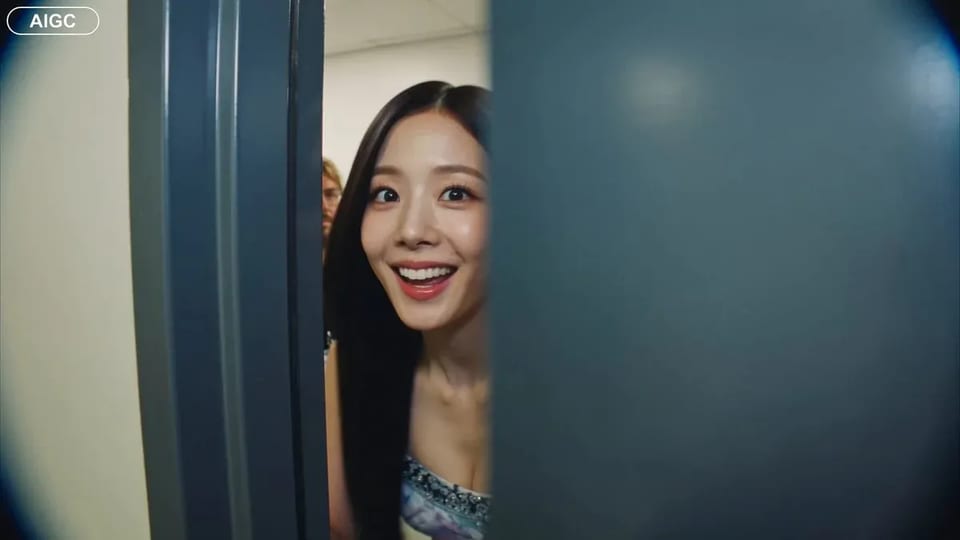
AI video generator results — cinematic motion stills with soft violet brand light
Handheld backstage idol vlog sample

CAMERA: Handheld DV 16mm camcorder aesthetic, first-person/selfie POV. CHASE always holds the camera. Natural hand shake, imperfect framing, delayed autofocus, clumsy zooms, occasional face cropping. The camcorder is never visible. LOOK: Soft vintage DV tape quality with slight blur, subtle tape noise, mild highlight bloom, flickering auto-exposure, muted contrast, natural skin tones. STYLE: Bright, playful K-pop idol vlog. Genuine smiles, eye contact, candid energy, quick handheld shots with backstage excitement. CHARACTER: CHASE, Korean female idol in her 20s. Long straight black hair, dewy skin, elegant Korean features, coral lips, large eyes, slim curvy figure. Wearing a stylish stage outfit with subtle glam makeup and sparkly earrings. SETTING: Backstage hallway of a music show studio with dressing room doors, CHASE's name tag on one door, snack table, overhead PA speaker, and blurred staff passing by. SEQUENCE: 1. Selfie: peeks into the hallway. "Hey guys, we're backstage!" 2. Whip pan down the corridor. "This hallway is so long!" 3. Stops at her dressing room, points at her name tag. "That's me!" 4. Close-up of the name tag as she taps it. Ambient audio only. 5. Quick outfit check with a spin near a mirror. "How do I look?" 6. At the snack table, grabs a snack. "Don't mind if I do." 7. Mid-bite, PA announcement interrupts. She laughs: "Wait—" 8. Selfie ending: hears the countdown, waves, makes a hand heart, then runs toward the stage. "That's my cue—see you after the stage!"

CAMERA: Handheld DV 16mm camcorder aesthetic, first-person/selfie POV. CHASE always holds the camera. Natural hand shake, imperfect framing, delayed autofocus, clumsy zooms, occasional face cropping. The camcorder is never visible. LOOK: Soft vintage DV tape quality with slight blur, subtle tape noise, mild highlight bloom, flickering auto-exposure, muted contrast, natural skin tones. STYLE: Bright, playful K-pop idol vlog. Genuine smiles, eye contact, candid energy, quick handheld shots with backstage excitement. CHARACTER: CHASE, Korean female idol in her 20s. Long straight black hair, dewy skin, elegant Korean features, coral lips, large eyes, slim curvy figure. Wearing a stylish stage outfit with subtle glam makeup and sparkly earrings. SETTING: Backstage hallway of a music show studio with dressing room doors, CHASE's name tag on one door, snack table, overhead PA speaker, and blurred staff passing by. SEQUENCE: 1. Selfie: peeks into the hallway. "Hey guys, we're backstage!" 2. Whip pan down the corridor. "This hallway is so long!" 3. Stops at her dressing room, points at her name tag. "That's me!" 4. Close-up of the name tag as she taps it. Ambient audio only. 5. Quick outfit check with a spin near a mirror. "How do I look?" 6. At the snack table, grabs a snack. "Don't mind if I do." 7. Mid-bite, PA announcement interrupts. She laughs: "Wait—" 8. Selfie ending: hears the countdown, waves, makes a hand heart, then runs toward the stage. "That's my cue—see you after the stage!"

Why This AI Video Generator Fits Qwen Image X

You already make stills with Qwen Image 3 on this site — the AI video generator is the motion desk next door. Use text to video when you only have a brief. Use image to video when a still from the image workspace should move. HappyHorse 1.1 is the default HD lane; Seedance 2 Fast and Mini help you iterate cheaper and quicker before a higher-quality pass.

How it works

Run the AI Video Generator in Three Steps

From a prompt or still to a short downloadable clip — no install, one account for image and video.

  1. 1

    Pick a video model

    Start on HappyHorse 1.1 for HD text to video and image to video, or switch to Seedance 2, Seedance 2 Fast, or Seedance 2 Mini. The picker shows badges so you can match speed vs quality.

  2. 2

    Write a prompt or upload a still

    Describe camera move, subject, and mood in plain language. For image to video, upload a starting photo — often a still you just made on /image — and say how it should move.

  3. 3

    Render, review, download

    Generate and wait for the short clip. Long runs queue in the background. Failed runs refund credits automatically. Paid plans include commercial use.

Who Uses This AI Video Generator

Short motion for social, ads, lessons, and storyboards — same Qwen Image X account as your stills.

  • Social creators

    Turn a hero still into a short moving cut for Reels or Shorts. Image to video keeps the look you already liked; text to video drafts b-roll when you only have a line of copy.

  • Growth marketers

    Test two motion tones on the same brief — HappyHorse for a polished HD pass, Seedance Fast for cheap variants — then keep the winner for paid social.

  • Course makers

    Animate a diagram or product still into a few-second explainer loop. Pair with Qwen Image 3 boards from the image workspace for a full lesson kit.

  • Storyboard teams

    Prototype camera moves before a shoot. Generate a short clip from a panel still, then iterate with a different model without re-uploading the frame.

  • Shop owners

    Make simple product motion from a catalog photo. Image to video turns a static packshot into a short scroll-stopping clip for listings and ads.

  • Indie filmmakers

    Sketch establishing motion and transitions in seconds. Use the AI video generator as a pre-vis desk, not a full edit suite.

What's included

Everything This AI Video Generator Ships With

  • HappyHorse 1.1 by default

    The video picker opens on HappyHorse 1.1 for HD text to video, image to video, and reference-style runs when the model supports them.

  • Seedance 2 family for iteration

    Seedance 2, Seedance 2 Fast, and Seedance 2 Mini sit in the same picker so you can trade speed and cost against polish without a second site.

  • Image to video from your stills

    Upload a starting photo — including one you made with Qwen Image 3 — and describe the motion. The reference stays loaded when you switch models.

  • Text to video from a brief

    No still? Write camera, subject, and mood in plain language and render a short clip for concept tests and b-roll drafts.

  • Commercial use on paid plans

    Paid plans include commercial licensing for ads and client work. Free-tier testing rules follow your plan and legal pages.

  • Automatic refunds on failed runs

    Timeouts, filters, or server errors refund credits automatically. You only spend on clips you receive.

Frequently Asked Questions About the AI Video Generator

What is the AI video generator on Qwen Image X?

It is the browser video workspace next to the image tools. You run text to video and image to video with HappyHorse 1.1 by default, and can switch to Seedance 2, Seedance 2 Fast, or Seedance 2 Mini in the same picker.

Is the AI video generator free?

Video costs more credits than stills. A default HappyHorse 1.1 clip is priced per second with a high floor, so signup freeCredits alone usually cannot cover a full video run. Top up credits or subscribe before generating; image signup credits are separate and work best on /image.

Which video model should I pick first?

Start with HappyHorse 1.1 when you want the default HD lane. Use Seedance 2 Fast or Mini for cheaper, faster drafts, then Seedance 2 when you want a higher-quality pass. The picker badges show speed and quality hints.

Can I turn an image into video?

Yes. Upload a starting still for image to video, describe the motion, and generate. Many users make a still on /image first, then animate it here without leaving Qwen Image X.

How long are the clips?

Length depends on the model and settings — short clips in the few-second range are typical. Check the generator controls for the selected model’s duration options before you run.

Can I use video outputs commercially?

Paid plans include commercial-use rights for ads and client deliverables. See the legal pages for exact terms. Free-tier testing is limited to personal evaluation unless your plan says otherwise.

What happens if a video run fails?

Failed runs refund credits automatically. Long jobs queue in the background so the workspace stays usable while a clip renders.

Do I need a separate video app?

No. The AI video generator runs in your browser on the same Qwen Image X account as image generation. Open /video and use the live generator.

Open the AI Video Generator Workspace

HappyHorse 1.1 default, Seedance models in one picker, text to video and image to video in the browser.