限时 6 折优惠!领取优惠
新品 — Qwen Image 3.0 · 注册积分免费试用

Qwen Image 3 密集排版与清晰文字——免费试用

做多格板式、清晰小标签与多语言海报。在线文生图与图生图。

Qwen Image 3 是 Qwen Image X 的默认模型——面向需要有序排版与清晰图内文字的静图免费在线生成器。写长需求或上传照片并说明改什么。注册积分覆盖默认档起步;付费方案增加用量与商业用途。

  • 一张静图内的密集多格板式
  • 小字仍保持可读
  • 多语言海报与界面风格排版
  • 文生图 + 图生图
  • 注册积分免费试用
  • 默认 1K;定稿时可升 2K
Qwen Image 3 产品主视觉——左侧字标标题与紫晶多格玻璃雕塑
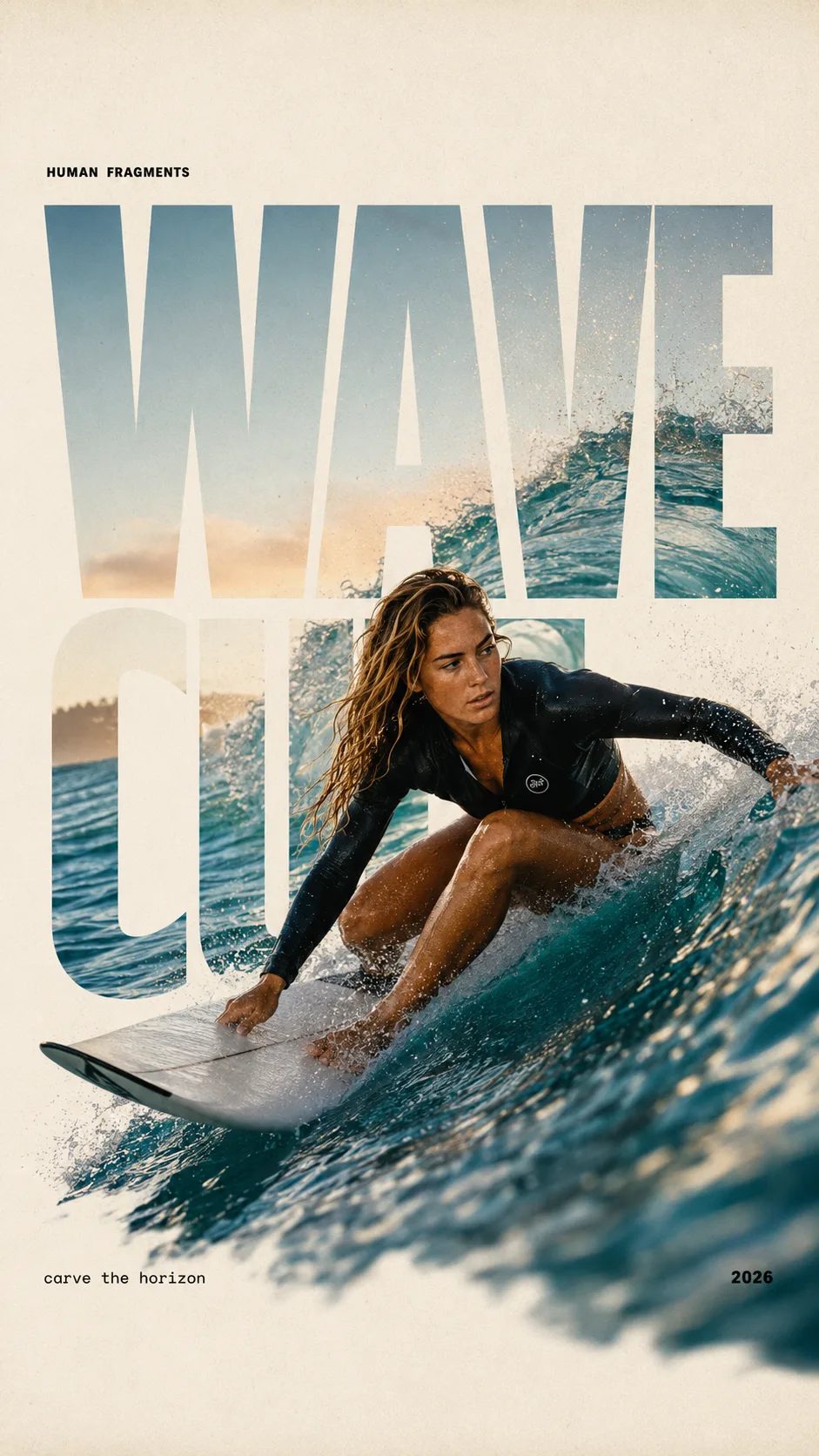
HUMAN FRAGMENTS editorial poster sample

Create a 9:16 editorial poster in the HUMAN FRAGMENTS visual system. Theme: [surfing / basketball / boxing / cake decorating] Subject: [gender, age, appearance, outfit] Action: [specific movement or handcraft] Scene: [location and environment] Title: [custom two-word title] Supporting line: [one short phrase] Year: 2026 Use oversized cropped typography as the main structural framework. The letters should act as windows that reveal the surrounding environment, while the main person remains visually complete in front of the type. Do not let the letters cut through the face, torso, arms, thighs, or other important parts of the body. Let one key action element break beyond the typography to create strong depth: 1. WAVE CUT — a surfer carving across a rising wave, with the board nose, hand, water spray, and curled wave breaking outside the letters. 2. RIM RISE — a basketball player reaching toward the hoop from a camera placed above the rim, with the basketball, hand, and hoop fully outside the letter masks and aligned naturally. 3. IMPACT FRAME — a boxer throwing a straight punch toward the camera, with the foreground glove enlarged and breaking beyond the typography while the gym remains inside the letters. 4. SOFT SWIRL — a graceful young woman decorating a cake, with the piping bag, hands, cake, and cream details extending beyond the letters while the bakery interior appears inside the type. Use realistic photography, believable anatomy, natural skin texture, strong foreground perspective, subtle paper grain, a warm off-white background, restrained colors, and clean editorial spacing. Keep the text minimal and freely placed: [Title] HUMAN FRAGMENTS [Short supporting line] 2026

Create a 9:16 editorial poster in the HUMAN FRAGMENTS visual system. Theme: [surfing / basketball / boxing / cake decorating] Subject: [gender, age, appearance, outfit] Action: [specific movement or handcraft] Scene: [location and environment] Title: [custom two-word title] Supporting line: [one short phrase] Year: 2026 Use oversized cropped typography as the main structural framework. The letters should act as windows that reveal the surrounding environment, while the main person remains visually complete in front of the type. Do not let the letters cut through the face, torso, arms, thighs, or other important parts of the body. Let one key action element break beyond the typography to create strong depth: 1. WAVE CUT — a surfer carving across a rising wave, with the board nose, hand, water spray, and curled wave breaking outside the letters. 2. RIM RISE — a basketball player reaching toward the hoop from a camera placed above the rim, with the basketball, hand, and hoop fully outside the letter masks and aligned naturally. 3. IMPACT FRAME — a boxer throwing a straight punch toward the camera, with the foreground glove enlarged and breaking beyond the typography while the gym remains inside the letters. 4. SOFT SWIRL — a graceful young woman decorating a cake, with the piping bag, hands, cake, and cream details extending beyond the letters while the bakery interior appears inside the type. Use realistic photography, believable anatomy, natural skin texture, strong foreground perspective, subtle paper grain, a warm off-white background, restrained colors, and clean editorial spacing. Keep the text minimal and freely placed: [Title] HUMAN FRAGMENTS [Short supporting line] 2026

Qwen Image 3 适合做什么(以及不适合什么)

Qwen Image X 上的 Qwen Image 3 生成器——为板式、海报与带标注样机提供能用的静图。

当工作需要结构时打开 Qwen Image 3:分镜网格、报纸式页面、试卷、双语广告,或带精细标签的包装。长提示词很合适——Image 3 为丰富的多区域静图而建,不只是柔光里的单一主体。注册后免费试用;这不是无限每日免费方案,商业权益随付费方案提供。

复制一段需求

可直接跑的 Qwen Image 3 提示词示例

三条成品向的需求:密集板式、清晰文字与多语言海报。复制一条,打开生成器,用注册积分免费试。

面向 Qwen Image 3 的多格信息图风格静图
Reference image
4:3

Example prompt output

3×3 知识板

A clean 3×3 educational board on white paper, each cell a small labeled diagram with short English titles, soft violet accent lines, even margins, print-ready still, no blurry text

排版 3×3 网格 用途 密集板式
Use this prompt
面向 Qwen Image 3 的双语海报样例
Reference image
3:4

Example prompt output

双语活动海报

Premium product poster, short English headline and short Chinese subheadline, soft purple gradient, large hero product photo, crisp readable type, luxury catalog look

语言 EN + ZH 用途 海报
Use this prompt
面向 Qwen Image 3、价格可读的菜单风格静图
Reference image
3:4

Example prompt output

带精细价格的菜单

Elegant restaurant menu board, short item names and prices in clean columns, soft paper texture, violet accent rules, high readability at small type, no gibberish

文字 精细标签 用途 菜单
Use this prompt

能力

Qwen Image 3 最擅长什么

四个侧面与公开的 Qwen Image 3 系列叙事一致——密集内容、精细细节、多语言知识与编辑循环——在 Qwen Image X 上交付。

一张静图内的丰富多格排版

需要分镜、试卷式讲义或多格信息板时,给 Qwen Image 3 写长而细的需求。平行区域比只会把一切糊成一团的单主体生成器更清晰。最好写清每一格要干什么,而不是只给一个氛围词。

Qwen Image 3 多格密集排版静图

小字与微细节站得住

当标签、价格或公式必须以小尺寸仍可读时,用 Qwen Image 3。人像与物体也更推向细腻质感——皮肤、头发、纸纹——放大后看起来有意图。短语尽量短;任何图像模型都仍难吃下超长段落。

Qwen Image 3 精细细节与小字样例

多语言海报与界面风格外观

做需要不止英文排字的海报与界面样机。Qwen Image 3 很适合双语活动与熟悉的网页或应用风格布局。发布前务必校对图内文字。

Qwen Image 3 多语言海报样例

图生图打磨,不必从头开始

上传草稿或产品照,只描述该改的部分。Qwen Image 3 支持图生图,可在保留主结构的同时换风格、修标签区或扩展场景。失败运行自动退积分。

Qwen Image 3 图生图换风格样例
使用方法

三步做出一张 Qwen Image 3 静图

打开已钉选 Qwen Image 3 的生成器,描述任务,下载或继续打磨。

  1. 1

    打开 Qwen Image 3

    本页已为你钉选模型。注册一次即可加载免费积分——开始默认档生成无需绑卡。

  2. 2

    写提示词或上传照片

    文生图用平常话描述分格、文字与语言。图生图则上传参考图并说明改什么。

  3. 3

    生成、检查文字、收尾

    审看小标签与排版。再跑一轮,或在值得定稿时把分辨率提到 2K。付费方案解锁商业用途。

使用场景

什么时候打开 Qwen Image 3

密集排版与可读文字比单张柔光肖像更重要的具体工作。

  • 课程设计师

    当很小的标题必须清楚时,用 Qwen Image 3 起草多格练习纸与带标注图示。一条长提示词可代替半天手工排版。

  • 增长营销

    交付双语活动海报与广告变体。用注册积分免费起步,再迭代标题,不必离开生成器。

  • 包装团队

    用精细标签文字做瓶与盒样机。用图生图重塑产品照风格,同时让品牌行文仍有意图。

  • 短剧编剧

    排出分镜网格与节拍表,方便导演在拍摄前审节奏。平行分格在一张静图中保持区分。

系列指南

本站上的 Qwen Image 2 vs Qwen Image 3

两者都在同一 Qwen Image X 选择器中运行。要密集排版与精细文字选 Image 3;要更快、更轻的草稿路线选 Image 2。

快速 Qwen Image 2 更快的草稿路线 打开 Image 2
默认 Qwen Image 3 密集 · 清晰 · 多语言 免费试用 Image 3
最适合先用 快速风格草稿与日常静图 多格板式、清晰小字、多语言海报
图内文字 短标签表现不错 精细字号与密集栏更强
排版密度 更简单的单场景静图 长提示词与多区域板式
速度 vs 画质(目录) 更快档(速度 5) 更高画质档(画质 5)
默认分辨率定价 轻量档一口价 1K = 3 积分;2K = 6
Qwen Image 3 上的创作者

大家用 Qwen Image 3 做出什么

密集板式、清晰标签、免费起步——不必装桌面设计套件。

“一个午休就出练习纸网格。”

我需要六个带小标题的标注格。Qwen Image 3 把板式收拾得够整齐,当天就能放进课堂幻灯片。

E
Elena V.
课程负责人

“中英文海报仍能读。”

双语上新视觉以前意味着两位外包。一次免费试跑就有可用初稿给团队投票。

J
Jon P.
效果营销

“导演能扫一眼的节拍表。”

一张多格静图取代了我第一次审片时的便利贴墙。图生图改了一格,不用重画全部九格。

S
Sofia M.
分镜师

“包装样机上的标签字。”

1K 时小字成分行仍像有意设计,然后我把留下的那张用 2K 收尾给工厂 PDF。

K
Kenji A.
DTC 创始人
常见问题

关于 Qwen Image 3 的问题

Qwen Image X 上的 Qwen Image 3 是什么?

Qwen Image 3 是 Qwen Image X 的默认图像模型——面向密集排版、精细图内文字与多语言海报的免费在线生成器。打开生成器即可在默认选中 Qwen Image 3 时运行文生图与图生图。

可以用注册积分免费试用 Qwen Image 3 吗?

可以。新账户获赠免费积分,可覆盖默认 1K 生成(注册 10 积分时为 3 积分)。开始无需信用卡。没有无限每日免费方案;更大用量请购买积分或订阅。

什么时候该用长提示词配 Qwen Image 3?

当静图需要许多区域时——分镜、试卷、多格板式,或含多块短文的海报。写清每个区域的任务;Image 3 在丰富排版上强于只有一个模糊氛围词。

Qwen Image 3 支持图生图编辑吗?

支持。上传参考静图并描述改动。写清必须固定的部分(产品外形、人脸、排版),只改目标区域,这样打磨会更干净。

可以导出哪些分辨率?

默认为 1K,方便便宜试跑。值得定稿时再升到 2K——目录定价为 1K / 2K 分别 3 / 6 积分。

这里的 Qwen Image 3 与 Qwen Image 2 有何不同?

在本站,Image 3 是更高画质、密集排版的默认。Image 2 是更快的草稿路线。两者同在一个选择器;用上方对比表并排看适合的任务。

Qwen Image 3 的输出可以商用吗?

付费方案含广告、产品与客户项目的商业授权。免费档静图仅供个人测试,除非方案另有说明。确切条款见法律页面。

Qwen Image X 是官方 Qwen 网站吗?

不是。Qwen Image X 是独立产品。模型名称与能力描述遵循公开的 Qwen 研究发布;计费与品牌由 Qwen Image X 运营。

哪里可以读到 Qwen Image 3.0 的新内容?

阅读博客路径 /blog/qwen-image-3-0-is-live-whats-new 的发布指南(4.5k-token 提示词、约 10px 文字、12 种语言)。然后在上方生成器免费试用。

如何在无卡的情况下免费在线使用 Qwen Image 3?

按 /blog/how-to-use-qwen-image-3-free-online 的分步教程——注册、花免费积分、在 1K 粘贴带引号文字的提示词。开始无需绑卡。

开始使用

免费在线试用 Qwen Image 3

注册送积分、密集排版、清晰文字,文生图与图生图——开始无需绑卡。