期間限定40% OFF今すぐ確認
新着 — Qwen Image 3.0 · 登録クレジットで無料体験

Qwen Image 3 密度の高いレイアウトとくっきり文字 — 無料で試す

マルチパネルボード、読める小さなラベル、多言語ポスターを作成。テキストから画像と画像から画像をオンラインで。

Qwen Image 3 は Qwen Image X の既定モデル — 整理されたレイアウトと画像内の明確な文字が要る静止画向けの無料オンラインジェネレーターです。長い要件を書くか写真を上げて変更内容を指定。登録クレジットで既定ティアの開始分をカバー;有料プランで量と商用利用を追加。

  • 1枚で密度の高いマルチパネルボード
  • 読めるままの小さな文字
  • 多言語ポスターと UI 風レイアウト
  • テキストから画像+画像から画像
  • 登録クレジットで無料体験
  • 既定は 1K;仕上げ時は 2K
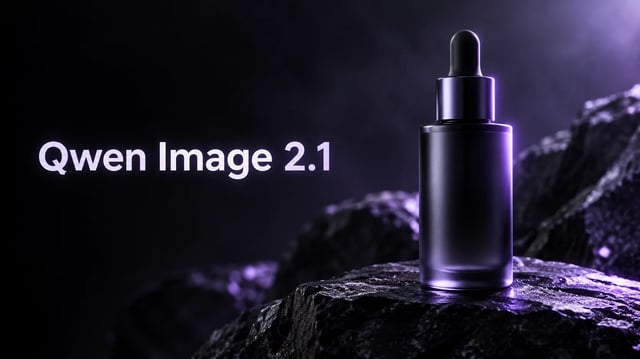
Qwen Image 3 プロダクトヒーロー — 左タイポタイトルとアメジストのマルチパネル・ガラス彫刻
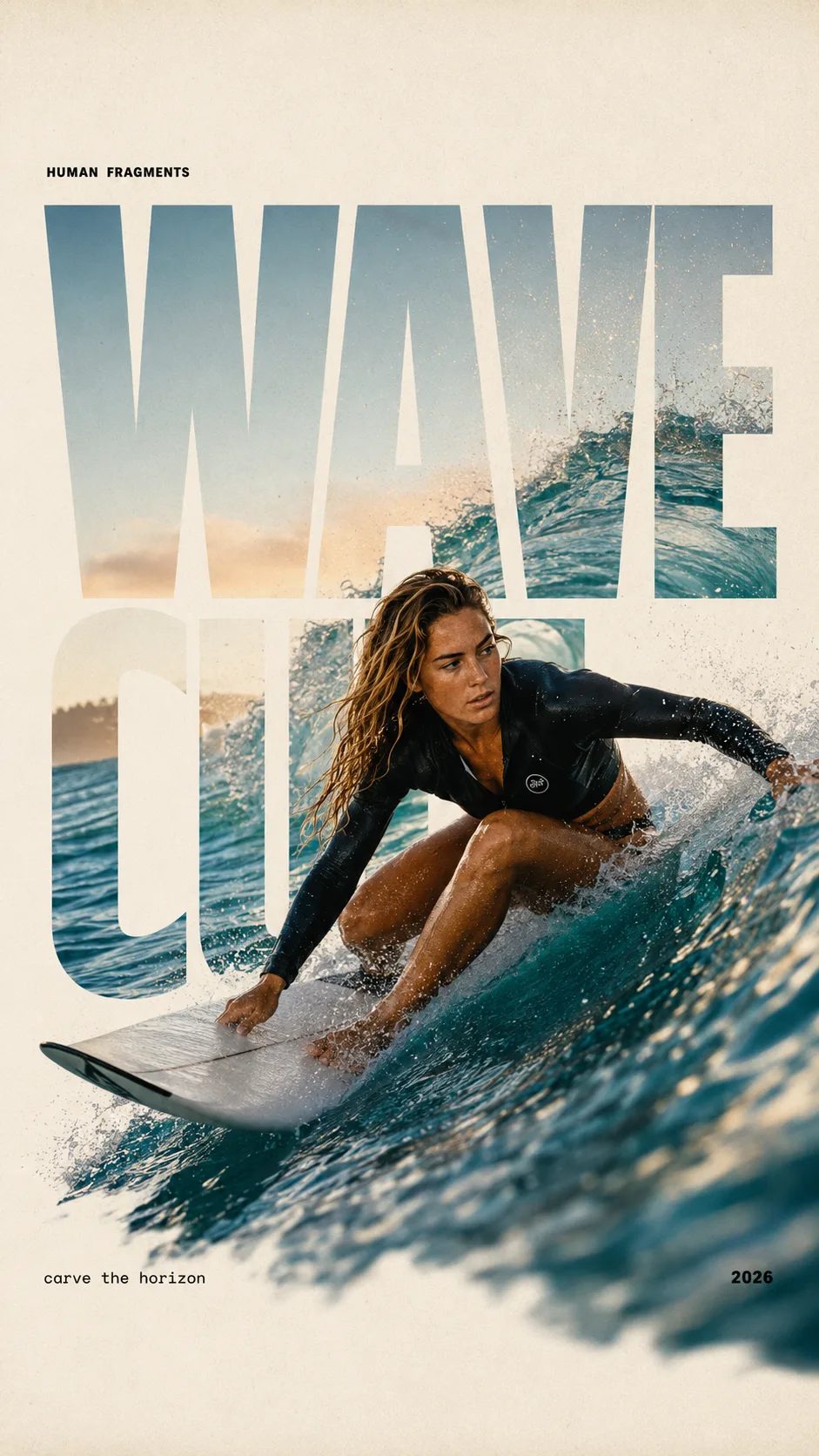
HUMAN FRAGMENTS editorial poster sample

Create a 9:16 editorial poster in the HUMAN FRAGMENTS visual system. Theme: [surfing / basketball / boxing / cake decorating] Subject: [gender, age, appearance, outfit] Action: [specific movement or handcraft] Scene: [location and environment] Title: [custom two-word title] Supporting line: [one short phrase] Year: 2026 Use oversized cropped typography as the main structural framework. The letters should act as windows that reveal the surrounding environment, while the main person remains visually complete in front of the type. Do not let the letters cut through the face, torso, arms, thighs, or other important parts of the body. Let one key action element break beyond the typography to create strong depth: 1. WAVE CUT — a surfer carving across a rising wave, with the board nose, hand, water spray, and curled wave breaking outside the letters. 2. RIM RISE — a basketball player reaching toward the hoop from a camera placed above the rim, with the basketball, hand, and hoop fully outside the letter masks and aligned naturally. 3. IMPACT FRAME — a boxer throwing a straight punch toward the camera, with the foreground glove enlarged and breaking beyond the typography while the gym remains inside the letters. 4. SOFT SWIRL — a graceful young woman decorating a cake, with the piping bag, hands, cake, and cream details extending beyond the letters while the bakery interior appears inside the type. Use realistic photography, believable anatomy, natural skin texture, strong foreground perspective, subtle paper grain, a warm off-white background, restrained colors, and clean editorial spacing. Keep the text minimal and freely placed: [Title] HUMAN FRAGMENTS [Short supporting line] 2026

Create a 9:16 editorial poster in the HUMAN FRAGMENTS visual system. Theme: [surfing / basketball / boxing / cake decorating] Subject: [gender, age, appearance, outfit] Action: [specific movement or handcraft] Scene: [location and environment] Title: [custom two-word title] Supporting line: [one short phrase] Year: 2026 Use oversized cropped typography as the main structural framework. The letters should act as windows that reveal the surrounding environment, while the main person remains visually complete in front of the type. Do not let the letters cut through the face, torso, arms, thighs, or other important parts of the body. Let one key action element break beyond the typography to create strong depth: 1. WAVE CUT — a surfer carving across a rising wave, with the board nose, hand, water spray, and curled wave breaking outside the letters. 2. RIM RISE — a basketball player reaching toward the hoop from a camera placed above the rim, with the basketball, hand, and hoop fully outside the letter masks and aligned naturally. 3. IMPACT FRAME — a boxer throwing a straight punch toward the camera, with the foreground glove enlarged and breaking beyond the typography while the gym remains inside the letters. 4. SOFT SWIRL — a graceful young woman decorating a cake, with the piping bag, hands, cake, and cream details extending beyond the letters while the bakery interior appears inside the type. Use realistic photography, believable anatomy, natural skin texture, strong foreground perspective, subtle paper grain, a warm off-white background, restrained colors, and clean editorial spacing. Keep the text minimal and freely placed: [Title] HUMAN FRAGMENTS [Short supporting line] 2026

Qwen Image 3 が向く仕事(向かない仕事)

Qwen Image X 上の Qwen Image 3 ジェネレーター — ボード、ポスター、ラベル付きモック向けの使える静止画。

構造が要る仕事のときに Qwen Image 3 を開いてください:絵コンテグリッド、新聞風ページ、試験シート、二言語広告、細字ラベルのパッケージ。長いプロンプトがよく効きます — Image 3 はソフト光の単一被写体だけでなく、情報の多い複数領域の静止画向けです。登録後に無料で試せます。毎日無制限の無料枠ではなく、商用権は有料プランに付きます。

要件をコピー

すぐ実行できる Qwen Image 3 のプロンプト例

密度の高いボード、くっきり文字、多言語ポスター向けの完成形に近い要件を3つ。1つコピーしてジェネレーターを開き、登録クレジットで無料体験。

Qwen Image 3 向けマルチパネル・インフォグラフィック風静止画
Reference image
4:3

Example prompt output

3×3 ナレッジボード

A clean 3×3 educational board on white paper, each cell a small labeled diagram with short English titles, soft violet accent lines, even margins, print-ready still, no blurry text

レイアウト 3×3 グリッド 用途 密度の高いボード
Use this prompt
Qwen Image 3 向け二言語ポスターサンプル
Reference image
3:4

Example prompt output

二言語キャンペーンポスター

Premium product poster, short English headline and short Chinese subheadline, soft purple gradient, large hero product photo, crisp readable type, luxury catalog look

言語 EN + ZH 用途 ポスター
Use this prompt
Qwen Image 3 向け、読める価格つきメニュー風静止画
Reference image
3:4

Example prompt output

細かい価格のメニュー

Elegant restaurant menu board, short item names and prices in clean columns, soft paper texture, violet accent rules, high readability at small type, no gibberish

文字 細字ラベル 用途 メニュー
Use this prompt

能力

Qwen Image 3 が最も得意なこと

公開の Qwen Image 3 シリーズの物語に沿う4つの側面 — 密度の高い内容、細かいディテール、多言語の知識、編集ループ — を Qwen Image X 上で。

1枚で豊かなマルチパネルレイアウト

絵コンテ、試験風シート、複数セルの情報ボードが要るとき、長く詳しい要件を Qwen Image 3 に渡します。並列領域は、すべてを1つのぼんやりした塊に押し込む単一被写体ジェネレーターよりはっきり分かれます。雰囲気の一語だけでなく、各パネルの仕事を書くと最良です。

Qwen Image 3 のマルチパネル・密度の高いレイアウト静止画

小さな文字と拡大に耐える微細ディテール

ラベル、価格、数式が小さいサイズでも読める必要があるときに Qwen Image 3 を使います。人物や物体も肌・髪・紙の目まで細かい質感を狙い、拡大が意図的に見えます。フレーズは短く;どの画像モデルでも長い段落はまだ難しいです。

Qwen Image 3 の細かいディテールと小さな文字のサンプル

多言語ポスターと UI 風の見た目

英語だけではない文字が要るポスターやモックインターフェースを構築。Qwen Image 3 は二言語キャンペーンや見慣れた Web/アプリ風レイアウトの有力候補です。公開前に画像内の文言は必ず校正してください。

Qwen Image 3 の多言語ポスターサンプル

やり直しなしの画像から画像磨き

下書きや商品写真を上げ、変えたいことだけを説明。Qwen Image 3 は画像から画像に対応し、主な構造を保ったまま再スタイル、ラベル領域の修正、シーン拡張ができます。失敗した実行はクレジットを自動返金します。

Qwen Image 3 の画像から画像・再スタイルサンプル
使い方

3ステップで Qwen Image 3 の静止画を作る

Qwen Image 3 を固定したジェネレーターを開き、仕事を説明し、ダウンロードまたは磨く。

  1. 1

    Qwen Image 3 を開く

    このページがモデルを固定します。無料クレジットを読み込むために一度登録 — 既定ティアの実行開始にカードは不要です。

  2. 2

    プロンプトを書くか写真を上げる

    テキストから画像ならパネル、文字、言語を平易な言葉で。画像から画像なら参照を上げ、変更内容を指定。

  3. 3

    生成し、文字を確認し、仕上げる

    小さなラベルとレイアウトを確認。もう1パス、または採用案を 2K に上げて仕上げ。有料プランで商用利用が解放されます。

活用シーン

Qwen Image 3 を開くタイミング

密度の高いレイアウトと読める文字が、ぼんやりした1枚のポートレートより大事な具体的な仕事。

  • コースデザイナー

    小さなタイトルがはっきり必要なとき、Qwen Image 3 でマルチパネルのワークシートとラベル付き図を下書き。長いプロンプト1本が手作業レイアウトの半日分に代わることもあります。

  • グロースマーケター

    二言語のキャンペーンポスターと広告バリエーションを出荷。登録クレジットで無料開始し、ジェネレーターを離れずに見出しを反復。

  • パッケージチーム

    細字ラベルつきのボトルや箱をモック。画像から画像で商品写真を再スタイルしつつ、ブランド文言を意図どおりに。

  • ショートドラマ作家

    絵コンテグリッドとビートシートを配置し、撮影前に監督がテンポを確認。並列パネルが1枚の中で明確に分かれます。

シリーズガイド

このサイト上の Qwen Image 2 と Qwen Image 3

どちらも同じ Qwen Image X ピッカーで動きます。密度の高いレイアウトと細字は Image 3;より速く軽い下書きレーンは Image 2。

高速 Qwen Image 2 より速い下書きレーン Image 2 を開く
既定 Qwen Image 3 密度 · くっきり · 多言語 Image 3 を無料で試す
最初に向く用途 すばやいスタイル下書きと日常の静止画 マルチパネルボード、小さな文字、多言語ポスター
画像内の文字 短いラベル向き 細字と密度の高い段組みに強い
レイアウト密度 より単純な単一シーンの静止画 長いプロンプトと複数領域のボード
速度 vs 品質(カタログ) より速いティア(speed 5) より高品質なティア(quality 5)
既定解像度の料金 ライトティアの定額 1K = 3 クレジット;2K = 6
Qwen Image 3 のクリエイター

Qwen Image 3 で作られているもの

密度の高いボード、くっきりラベル、無料スタート — デスクトップのデザインスイートなし。

“昼休み1回でワークシートグリッド。”

小さなタイトル付きのセルが6つ必要でした。Qwen Image 3 はボードが整っていて、その日のうちに授業スライドへ入れられました。

E
Elena V.
カリキュラム責任者

“まだ読める EN + ZH ポスター。”

二言語のローンチアートは以前フリーランス2人分でした。無料体験1回で、チーム投票に使える初稿が取れました。

J
Jon P.
パフォーマンスマーケター

“監督がざっと見られるビートシート。”

マルチパネルの静止画が初回レビューの付箋ウォールに取って代わりました。画像から画像で1パネルだけ直し、9枚全部を描き直さずに済みました。

S
Sofia M.
絵コンテアーティスト

“パッケージモック上のラベル文字。”

1K でも成分の細字が意図どおり。採用案は工場向け PDF 用に 2K で仕上げました。

K
Kenji A.
DTC 創業者
FAQ

Qwen Image 3 についての質問

Qwen Image X 上の Qwen Image 3 とは?

Qwen Image 3 は Qwen Image X の既定画像モデル — 密度の高いレイアウト、細かい画像内文字、多言語ポスター向けの無料オンラインジェネレーターです。ジェネレーターを開くと既定で Qwen Image 3 が選ばれ、テキストから画像と画像から画像を実行できます。

登録クレジットで Qwen Image 3 を無料体験できる?

はい。新規アカウントは既定の 1K 生成(freeCredits 10 で 3 クレジット)をカバーできる無料クレジットを取得。開始にクレジットカードは不要。毎日無制限の無料枠はありません;量が増えたらクレジット購入または購読。

Qwen Image 3 で長いプロンプトを使うタイミングは?

静止画に多くの領域が要るとき — 絵コンテ、試験シート、複数セルのボード、短い文字ブロックが複数あるポスター。各領域の仕事を説明してください。Image 3 は曖昧な雰囲気の一語より、豊かなレイアウトに強いです。

Qwen Image 3 は画像から画像の編集に対応する?

はい。参照の静止画を上げ、変更内容を説明。固定すべきもの(製品形状、顔、レイアウト)は残し、直す領域だけ変えると磨きパスがきれいに保たれます。

書き出せる解像度は?

既定は安い試行向けの 1K。採用案を仕上げるときは 2K へ — カタログ料金は 1K / 2K が 3 / 6 クレジット。

ここでの Qwen Image 3 と Qwen Image 2 の違いは?

このサイトでは Image 3 がより高品質で密度の高いレイアウト向けの既定。Image 2 はより速い下書きレーン。どちらも同じピッカーにあり、上の比較表で用途の並びを確認できます。

Qwen Image 3 の出力は商用利用できる?

有料プランには広告、製品、クライアント案件向けの商用ライセンスが含まれます。無料枠の静止画は、プランに別段の定めがない限り個人テスト用です。正確な条件は法的ページを参照。

Qwen Image X は公式の Qwen サイト?

いいえ。Qwen Image X は独立製品です。モデル名と能力の説明は公開の Qwen 研究リリースに沿い、課金とブランドは Qwen Image X が運営します。

Qwen Image 3.0 の新機能はどこで読める?

ブログの /blog/qwen-image-3-0-is-live-whats-new でリリースガイドを(4.5k トークンのプロンプト、約 10px 文字、12言語)。その後、上のジェネレーターで無料体験してください。

カードなしで Qwen Image 3 を無料オンラインで使うには?

/blog/how-to-use-qwen-image-3-free-online のステップ解説に従ってください — 登録、無料クレジットの使用、1K で引用テキスト入りプロンプトを貼る。開始にカードは不要です。

はじめる

Qwen Image 3 をオンラインで無料体験

登録クレジット、密度の高いレイアウト、くっきり文字、テキストから画像と画像から画像 — 開始にカード不要。